Chmod Calculator
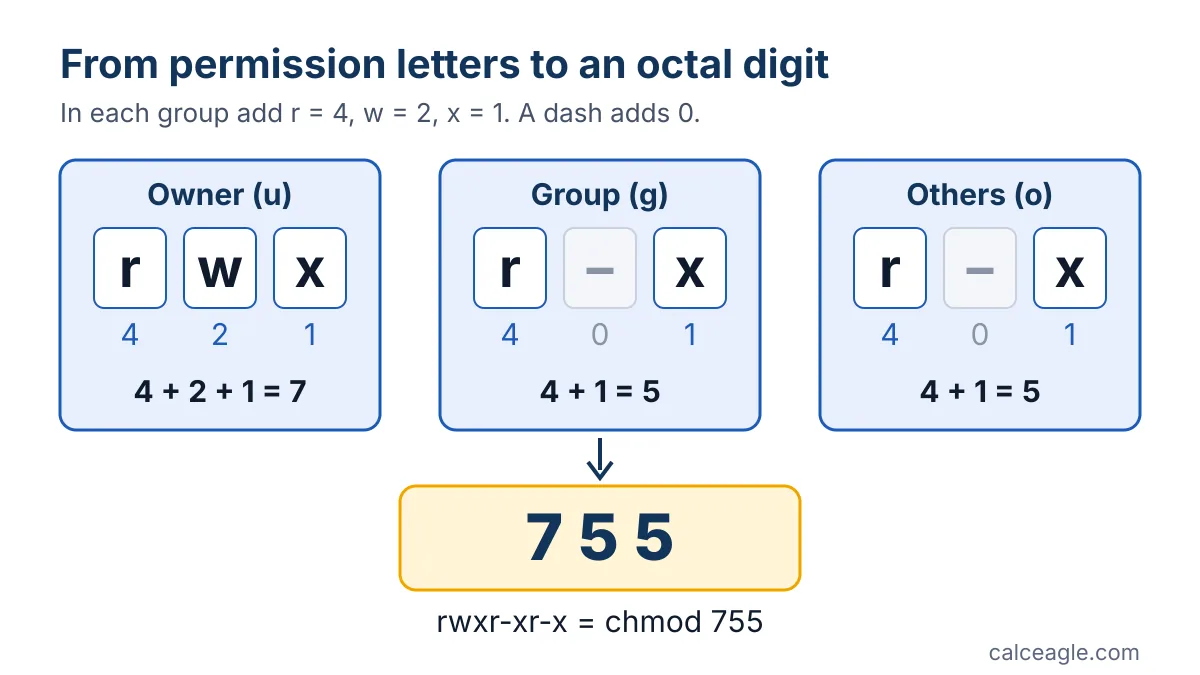
To turn Linux permissions into a chmod number, add 4 for read, 2 for write and 1 for execute for each of the three classes: owner, group and others. So rwxr-xr-x is 755 (4+2+1, 4+1, 4+1) and rw-r--r-- is 644.
Tick the boxes, click a preset or type an octal or symbolic mode. The other fields update as you go, and you get the matching chmod commands plus a plain-English explanation of who can do what.
How to use the chmod calculator
- Tick Read (4), Write (2) and Execute (1) for Owner (u), Group (g) and Others (o), or click one of the Common presets such as 644 or 755.
- Tick Setuid, Setgid or Sticky under Special bits only if you need them (see the table below).
- Or type a mode directly. Octal (numeric) takes 3 or 4 digits from 0 to 7, and Symbolic (ls -l) takes the nine letters you see in
ls -loutput, such asrwxr-x---. Every other field updates as you type. - Under Applies to, choose A file or A directory. This sets the type letter in the
ls -lstring (-ord) and changes the plain-English explanation, because r, w and x mean different things for directories. - Press Calculate (or click a preset). Copy the numeric command, such as
chmod 755 file, or the symbolic one, such aschmod u=rwx,g=rx,o=rx file, and replacefilewith your file or directory name.
chmod permission formula
Each class of user gets one octal digit made by adding the values of the permissions it has. An optional fourth digit in front holds the special bits.
| Bit | Value | Shown in ls -l | On a file | On a directory |
|---|---|---|---|---|
| Read | 4 | r | View the contents | List the names inside |
| Write | 2 | w | Change the contents | Create and remove entries |
| Execute | 1 | x | Run it as a program | Enter it and access files inside |
| Set-user-ID | 4000 | s or S in the owner's x spot | Run with the file owner's user ID | Ignored on most systems |
| Set-group-ID | 2000 | s or S in the group's x spot | Run with the file's group ID | New files inherit the directory's group on most systems |
| Sticky (restricted deletion) | 1000 | t or T in the others' x spot | No standard effect | Users can remove or rename only files they own |
Example: making a deploy script executable
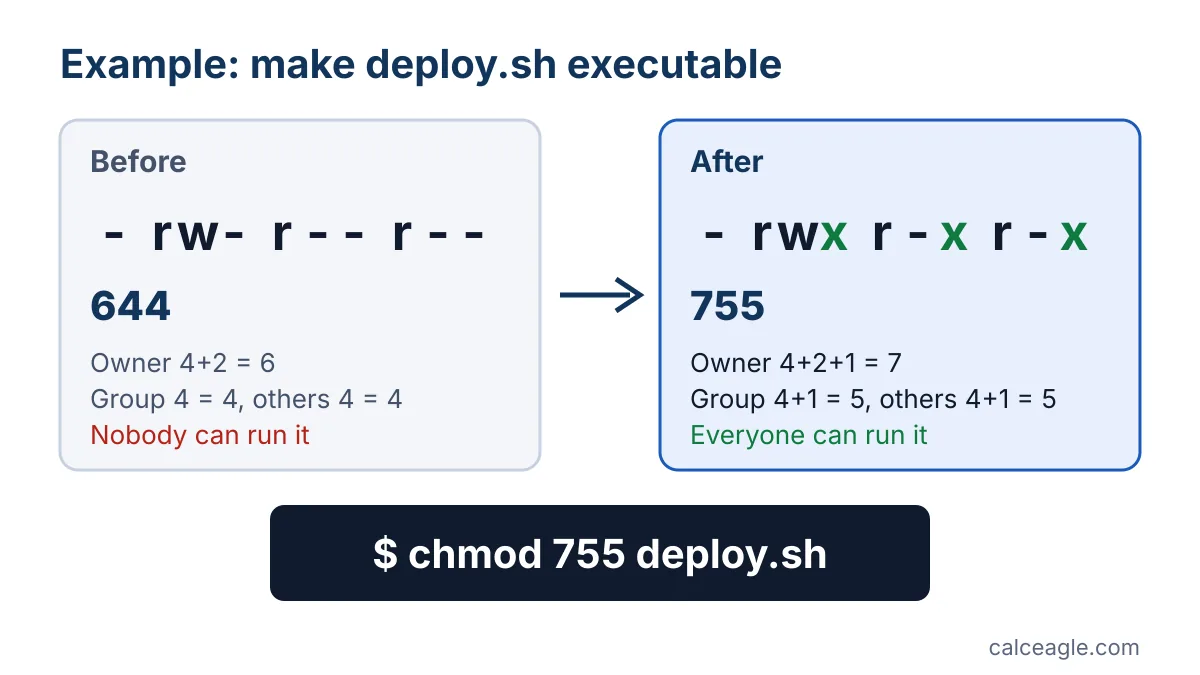
Say ls -l deploy.sh prints -rw-r--r--. That is mode 644: the owner can read and write, everyone else can only read, and nobody can run it. You want the owner to keep full control and everyone else to be able to read and run it.
- Owner: read + write + execute = 4 + 2 + 1 = 7
- Group: read + execute = 4 + 1 = 5
- Others: read + execute = 4 + 1 = 5
The mode is 755, so run chmod 755 deploy.sh, or the symbolic equivalent chmod u=rwx,g=rx,o=rx deploy.sh. Afterward ls -l shows -rwxr-xr-x.
A special-bit example: a shared team folder where new files should keep the team's group needs setgid (2) in front of 775, giving 2775. For a directory, ls -l shows drwxrwsr-x; the lowercase s means setgid is on and the group can also enter the folder.
How to read the result
- Three or four digits. 755 and 0755 are the same mode. A fourth leading digit appears only when a special bit is set, as in 4755 or 1777.
- Lowercase s or t means the special bit and the matching execute bit are both on. Uppercase S or T means the special bit is on but that execute bit is off, which is rarely what you want. These letters follow the POSIX
lsspecification. - The symbolic command uses
=, so it sets each class exactly instead of adding to what is already there. The calculator writes the sticky bit as a separate+tclause because POSIX leaveso+tundefined. - An extra character after the nine letters in
ls -loutput, often+or., means another access-control method, such as an access control list, also applies. The calculator accepts it in the symbolic box but ignores it.
Common permission presets
| Mode | ls -l | Typical use |
|---|---|---|
| 644 | -rw-r--r-- | Ordinary files that others may read, such as web pages |
| 755 | -rwxr-xr-x | Scripts and programs, and directories others need to enter |
| 600 | -rw------- | Private files. OpenSSH ignores a private key file that others can access. |
| 700 | drwx------ | Private directories, such as the ~/.ssh directory OpenSSH recommends keeping to yourself |
| 664 | -rw-rw-r-- | Files a team edits through a shared group |
| 775 | drwxrwxr-x | Shared project directories |
| 1777 | drwxrwxrwt | World-writable shared directories such as /tmp |
| 777 | -rwxrwxrwx | Almost never appropriate (see below) |
Assumptions and limitations
- The calculator covers the classic mode bits only. Access control lists, SELinux contexts and file attributes such as "immutable" can still allow or block access, and GNU notes that mode bits alone don't guarantee an operation will succeed.
- Only the file's owner or a privileged user (root) can change its mode.
- The octal and symbolic meanings come from POSIX, so they are the same on Linux, macOS and other Unix-like systems. Some details differ: GNU
chmodkeeps a directory's setuid and setgid bits when you use a plain numeric mode like 755. To clear them, name them (chmod g-s dir) or use a five-digit mode such as 00755, which is a GNU extension.
Common mistakes
- Using 777 to fix a "permission denied" error. It lets any user on the system change or replace the file. Find out which user needs access and grant just that, usually with 755, 775 or group ownership.
- Running
chmod -R 755on a whole tree. That makes every file executable, including images and config files.chmod -R u=rwX,go=rX diruses capital X, which POSIX defines as execute only for directories and files that already have an execute bit. - Removing x from a directory. Without execute (search) permission, users can't open anything inside, even if they have read or write.
- Reading the digits in the wrong order. It is always owner, then group, then others. 640 lets the group read; 604 lets everyone except the group read.
- Typing 8 or 9. Octal digits only go from 0 to 7.
Note: This tool explains standard Unix permission bits. On production servers, check your distribution's and application's security guidance before loosening permissions.
Frequently asked questions
What does chmod 755 mean?
The owner gets read, write and execute (4 + 2 + 1 = 7), and the group and everyone else get read and execute (4 + 1 = 5). ls -l shows -rwxr-xr-x for a file or drwxr-xr-x for a directory. It is the usual mode for scripts, programs and directories other users need to enter.
What is the difference between 644 and 755?
Both let only the owner write. 755 adds execute (x) for everyone, which lets a file run as a program and lets users enter a directory. Use 644 for ordinary files and 755 for programs, scripts and directories.
What do s, S, t and T mean in ls -l output?
An s in the owner or group execute position means setuid or setgid is set along with execute; S means the special bit is set without execute. A t in the others position means the sticky (restricted deletion) bit is set with execute; T means it is set without execute.
How do I make a file executable only for me?
Use chmod u+x file to add execute for the owner and leave everything else alone. To lock the file down completely, chmod 700 file gives you read, write and execute and removes all access for the group and others.
Is chmod 777 safe?
Usually not. 777 lets every user on the system read, change and run the file, or create and delete files in the directory. Give access to the specific user or group that needs it instead. Shared temporary directories use 1777, where the sticky bit stops users from deleting each other's files.
Sources and references
- chmod — change the file modes (The Open Group Base Specifications, Issue 8) — IEEE and The Open Group (POSIX)
- ls — list directory contents (The Open Group Base Specifications, Issue 8) — IEEE and The Open Group (POSIX)
- GNU Coreutils manual: Structure of File Mode Bits — GNU Project / Free Software Foundation
- GNU Coreutils manual: Directories and the Set-User-ID and Set-Group-ID Bits — GNU Project / Free Software Foundation
- ssh(1) manual page (FILES section) — OpenBSD / OpenSSH
Formulas and content last reviewed on October 13, 2026. Last updated October 13, 2026. Results are estimates for general information only. Spotted a problem? Tell us and we will check it.